
Road Designer
Free to play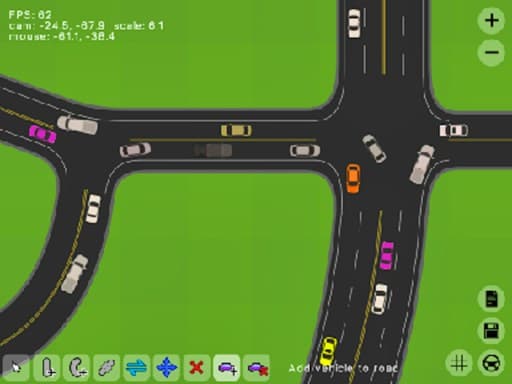
Road Designer
Game by GamePix. The provider may show ads and use cookies. Learn more
- Category
- Puzzle
- Platform
- Web browser
- Provider
- GamePix
- Price
- Free to play
About Road Designer
Road Designer hands you a piece of city and asks you to plan its streets. Each level works as a traffic puzzle: vehicles need to get across the map, and the road network you build decides whether they move smoothly or jam up. Intersections and one-way streets are the main building pieces, and choosing where each one goes is the core of the game, more than how fast you build.
Once a layout is down, you watch the cars drive through it, which is the real check on your planning. A street that only runs one way can keep two streams of traffic from meeting head on, while a well-placed intersection lets routes cross where they have to. Every level asks for its own layout, so the answer that solved one puzzle rarely fits the next map. A wide, landscape view on computers and phones leaves room to see the whole network at once.
Game provided by GamePix
How to play Road Designer
Objective
Design a road network on each level, using intersections and one-way streets, so that every vehicle can travel across your layout without the traffic jamming.
Getting started
- Turn a phone sideways before the first level; the road map is designed for a landscape screen.
- Study the level and work out where the vehicles need to go before you place a single road.
- Build the network with intersections where routes must cross and one-way streets where traffic should flow in only one direction.
- Let the vehicles run and watch how they move through your design, looking for spots where they bunch up.
- Once a level is solved, carry what worked into the following traffic puzzle and its new map.
Tips
- Use one-way streets to separate opposing traffic. Cars that never meet head on are far less likely to clog an intersection.
- Keep intersections to the places that truly need them; every junction is a point where streams of vehicles have to share space.
- Plan the whole route before building. Each level is a traffic flow puzzle, so a layout put together piece by piece often lacks a crossing it needed.
Play in your browser. No download needed.
Road Designer FAQ
What do you build in Road Designer?
Roads, intersections and one-way streets. Each level gives you a traffic puzzle, and the network you lay out has to direct vehicles smoothly across the map. Watching the cars drive through it shows whether your plan works.
Why use one-way streets in Road Designer?
They control the direction of traffic. Sending vehicles one way along a street keeps opposing flows apart, which helps prevent jams at intersections and makes complicated layouts easier to manage.
Is Road Designer a puzzle game or a building game?
Both. You design road networks like a street blueprint, but every level is really a traffic flow puzzle with a layout to solve. Careful planning matters far more than speed.