
Hex Mine 3D
Free to play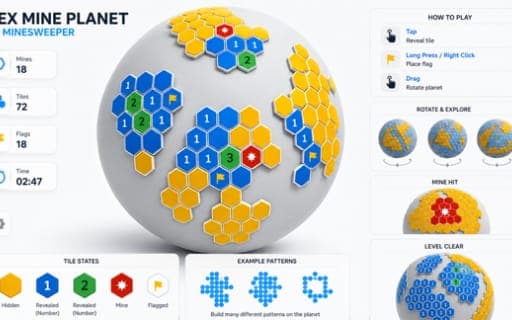
Hex Mine 3D
Game by Playgama. The provider may show ads and use cookies. Learn more
- Category
- Puzzle
- Platform
- Web browser
- Provider
- Playgama
- Price
- Free to play
About Hex Mine 3D
Hex Mine 3D takes the logic of a classic mine-hunting puzzle and wraps it around a 3D globe made of hexagonal tiles. Every level hides mines beneath some of the hexes. Open a safe tile and it shows a number telling you how many mines touch it, and since each hexagon has six neighbours rather than eight, the counting works a little differently from a square grid. Open a mine, though, and the puzzle resets.
The aim is to flag every mine and clear the board without a single detonation. You spin the sphere to see its far side, zoom with the on-screen buttons when tiles bunch together, and lean on a limited stock of hints when a deduction will not come. A timer runs, but it never punishes you, so careful reasoning beats guessing. Early levels use small grids with clear patterns, while later spheres grow larger and scatter mines more unevenly.
Game provided by Playgama
How to play Hex Mine 3D
Objective
Flag every mine hidden under the hexagonal tiles and clear the rest of the globe without ever opening a mine.
Controls
Desktop
- Drag: rotate the hex sphere
- Left click: reveal a tile's number
- Right click: flag a suspected mine
- + and − buttons: zoom in or out
- Hint button: uncover one safe tile
Mobile
- Swipe: rotate the hex sphere
- Tap: reveal a tile's number
- Long press: flag a suspected mine
- + and − buttons: zoom in or out
- Hint button: uncover one safe tile
Getting started
- Drag or swipe the globe to look over the whole hex grid before you open anything.
- Left click or tap a tile to reveal it; blue tiles are safe and show how many mines touch them.
- Count the six neighbours around each number and work out which unopened orange tiles must hide mines.
- Right click or long press those tiles to flag them, then open the neighbours you have proved safe.
- Keep going until every mine is flagged and the board is clear, remembering that opening a mine resets the puzzle.
Tips
- When a number equals the count of unopened tiles around it, every one of those tiles is a mine, so flag them all at once.
- If the flags beside a number already match its count, the remaining neighbours are safe to open.
- Spin the globe often, because a hex near the edge of your view has neighbours on the far side that are easy to forget.
- Save hints for real dead ends; they are limited, and each one reveals just a single safe tile.
- Ignore the timer, since it never penalizes you; a slow, certain move is always better than a guess that sets off a mine.
Play in your browser. No download needed.
Hex Mine 3D FAQ
How do the numbers work in Hex Mine 3D?
Each number shows how many mines touch that hexagon. A hex has six neighbours instead of the eight on a square grid, so count only the six tiles sharing an edge with it, including ones that wrap around the globe.
What happens if you open a mine in Hex Mine 3D?
Opening a mine resets the puzzle and you start that level again. A wrong flag, on the other hand, carries no immediate penalty and does not end the level, so flag freely while you reason.
How do you flag a tile in Hex Mine 3D on a phone?
Long press a tile to flag it as a suspected mine. A normal tap reveals a tile, swiping rotates the globe, and the + and − buttons zoom in when tiles are packed tightly together.
Is there a time limit in Hex Mine 3D?
A timer counts while you play, but it never punishes you. You can rotate, zoom and think for as long as you need, and completed levels stay available if you want to replay them.