
Winged Wheels 2
Free to play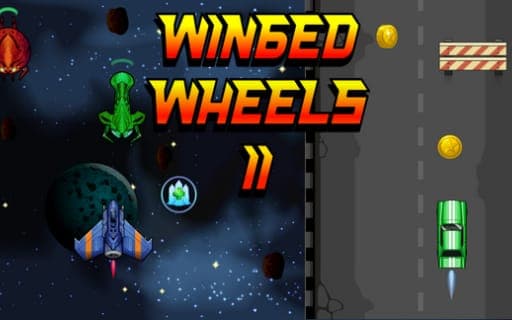
Winged Wheels 2
Game by Playgama. The provider may show ads and use cookies. Learn more
- Category
- Racing
- Platform
- Web browser
- Provider
- Playgama
- Price
- Free to play
About Winged Wheels 2
Winged Wheels 2 asks you to do two things at once, literally. The screen is split in two, with a car driving along a road on one side and a spaceship flying through space on the other, and you control both in real time. One vehicle has to stay clear of enemies and obstacles while its partner gathers coins and power-ups, so your attention has to jump between them constantly.
Health is the key resource. Each collision with an enemy or obstacle takes one health, and so does losing a coin, which means a lapse in either lane hurts. Power-ups help: Magnetic Field pulls coins toward your vehicle, Energy Shield wipes out any enemy or obstacle it touches, Extra Life adds a life, and the Weapon System launches rockets on its own at whatever threat is closest. Coins buy upgrades after each run, extending power-up durations and rocket ammo, and unlock new cars and spaceships. Random events shake up runs, and a global leaderboard ranks the best multitaskers.
Game provided by Playgama
How to play Winged Wheels 2
Objective
Steer the car and the spaceship at the same time, avoiding enemies and obstacles while collecting coins, and spend the coins on upgrades to climb the leaderboard.
Controls
Desktop
- Left Arrow: move the car left
- Right Arrow: move the car right
- A: move the spaceship left
- D: move the spaceship right
Mobile
- Left-side swipe: steer the spaceship
- Right-side swipe: steer the car
Getting started
- Start a run with one hand on the left and right arrows for the car and the other on A and D for the spaceship.
- On a phone, swipe on the left half for the spaceship and on the right half for the car.
- Dodge enemies and obstacles with one vehicle while steering the other into coins and power-ups.
- Grab power-ups such as Energy Shield or Magnetic Field when they appear to make the run easier.
- After the run, spend coins on upgrades and new vehicles, then try to climb higher on the leaderboard.
Tips
- Losing a coin costs one health just like hitting an obstacle, so the collecting vehicle needs as much attention as the one dodging hazards.
- Energy Shield wipes out whatever enemy or obstacle it touches, so while it lasts you can shift most of your focus to the other vehicle.
- Upgrade Magnetic Field early: coins drift to you on their own while it runs, which makes losing a coin, and the health it costs, less likely.
- Weapon System rockets fire at the nearest threat automatically, and upgrades raise their ammo capacity, so it pays off most on busy stretches.
Play in your browser. No download needed.
Winged Wheels 2 FAQ
How do you control two vehicles in Winged Wheels 2?
On a computer, the left and right arrows move the car while A and D move the spaceship. On a phone, swipe on the left side for the spaceship and on the right side for the car.
What costs you health?
Every collision with an enemy or an obstacle takes away one health, and a lost coin takes another. Extra Life power-ups add a life, but steady attention to both vehicles is the real protection.
What do the power-ups do in Winged Wheels 2?
Magnetic Field draws coins to your vehicle, Energy Shield breaks any enemy or obstacle it hits, Extra Life grants another life and Weapon System fires rockets at the nearest threat. Upgrades extend durations or rocket ammo.
What do coins buy?
Coins pay for upgrades after each run, improving power-ups and abilities, and they unlock new cars and spaceships with their own looks. Collecting them is also how you rise on the global leaderboard.