
Cartoon Traffic Racing Paper Derby
Free to play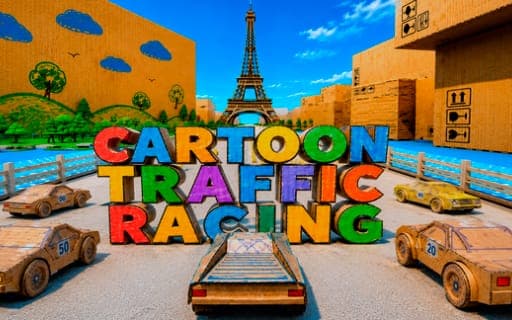
Cartoon Traffic Racing Paper Derby
Game by Playgama. The provider may show ads and use cookies. Learn more
- Category
- Racing
- Platform
- Web browser
- Provider
- Playgama
- Price
- Free to play
About Cartoon Traffic Racing Paper Derby
Cartoon Traffic Racing Paper Derby builds its tracks out of paper and cardboard. Tiny cardboard cars race along busy roads crowded with other traffic, oversized stationery, ramps and interactive obstacles, and every race is a fight for first place. The maps are designed as playgrounds, so there is usually more than one way to get past a rival.
You can race clean, weaving between cars and avoiding collisions, or lean into the chaos by using ramps, knocking into obstacles and causing pile-ups that slow your opponents. Nitro gives a burst of speed, a handbrake helps on tight turns, and you can switch camera views or look behind you to check on the pack. Maps grow more demanding as you go, with heavier traffic to thread through. Winning races earns rewards that unlock new cars with their own designs and performance, and each car can be customized to fit how you like to drive.
Game provided by Playgama
How to play Cartoon Traffic Racing Paper Derby
Objective
Finish first in each race by weaving through traffic and using ramps and the paper-craft scenery, earning rewards that unlock and customize new cardboard cars.
Controls
Desktop
- W or Up Arrow: accelerate
- S or Down Arrow: brake
- A or Left Arrow: steer left
- D or Right Arrow: steer right
- Space: handbrake
- F: nitro
- C: change camera
- B: look back
Getting started
- Choose a car and start a race; each one is a contest for first place on a busy paper-craft road.
- Accelerate with W or the Up Arrow and steer with A and D or the Left and Right Arrows.
- Weave between the cars in traffic, braking with S or the Down Arrow when a gap closes.
- Hit ramps and use the oversized stationery and other objects to find faster ways past rivals.
- Press F for a nitro boost on open stretches, and B to look back at the cars chasing you.
Tips
- Save nitro for straight, open road; firing it into dense traffic is a quick way to crash instead of overtake.
- Use the handbrake on Space for sharp turns around the oversized stationery rather than braking to a crawl.
- Collisions are part of the game, so nudging a rival into an obstacle can be as useful as passing them cleanly.
- Press C to cycle camera views and keep the one that shows the traffic ahead most clearly on busy maps.
- Winning races earns the rewards that unlock new cars, so focus on first place before causing chaos for its own sake.
Play in your browser. No download needed.
Cartoon Traffic Racing Paper Derby FAQ
What are the controls in Cartoon Traffic Racing Paper Derby?
W or Up Arrow accelerates, S or Down Arrow brakes, and A/D or Left/Right Arrow steer. Space is the handbrake, F fires nitro, C changes the camera and B lets you look back.
How do you unlock new cars?
Win races to earn rewards, then use them to unlock new cardboard cars with their own designs and performance. Each car can be customized to suit your playstyle, which helps on the tougher maps with heavier traffic.
Can you crash into other cars on purpose?
Yes. Causing accidents and crashing into obstacles is part of the game, and the interactive maps are built for it. Pushing rivals into trouble can be just as effective as a clean overtake when first place is at stake.