
Car Crash Sandbox
Free to play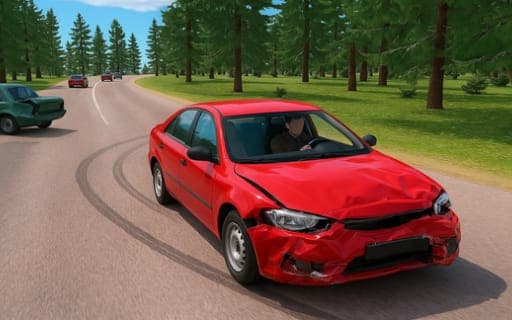
Car Crash Sandbox
Game by Playgama. The provider may show ads and use cookies. Learn more
- Category
- Racing
- Platform
- Web browser
- Provider
- Playgama
- Price
- Free to play
About Car Crash Sandbox
Car Crash Sandbox starts with a large map, a car and no storyline. Send vehicles down long slopes, into breakable obstacles or into each other, and the damage model bends, crumbles and strips parts from them on impact. Maps cover a beach, a city, country highways, winding roads and training grounds, and you can layer weather on top of any session, anything from a snowstorm to a meteor shower.
Handling comes in three flavors. Drift lowers rear grip so the car slides through turns, Arcade forgives mistakes and steers more easily, and Sport sharpens the throttle, brakes, steering and suspension. There is a drone mode for shooting objects from above, a key that throws the car into the air, slow motion and a first-person camera. Tasks grow larger as you go and pay out statistical points and rewards, and every car can be retuned, from body and window colors to suspension stiffness, wheel alignment, tire width and wheel diameter.
Game provided by Playgama
How to play Car Crash Sandbox
Objective
Wreck cars in whatever way you like across the maps, take on the growing tasks for statistical points and rewards, and tune each vehicle to suit your style of destruction.
Controls
Desktop
- WASD or arrow keys: drive
- Space: handbrake, or shoot in drone mode
- Shift: nitro
- F: launch the car into the air
- N: change vehicle
- R: repair the vehicle
- C: switch between distant and first-person cameras
- V: slow motion
- Tab: pause
Mobile
- Virtual joystick and buttons: steer, drive and trigger actions on screen
Getting started
- Choose a large map such as the city or the beach, then pick a vehicle to take out on it.
- Select a handling mode; Arcade is the most forgiving for a first session, with easier turns and less lost grip.
- Drive with WASD or the arrow keys, or the virtual joystick on a phone, and press Shift for nitro before an impact.
- Press F to fling the car into the air, V for slow motion and C to swap between the distant and first-person cameras.
- Add weather such as a snowstorm or meteor shower, then press R to repair and N to try another vehicle.
Tips
- Arcade suits learning the maps, while Drift's reduced rear grip rewards practice on the winding roads once you can hold a slide.
- Drone mode turns Space into a weapon, so use it to blow apart objects from above when ground-level crashes get repetitive.
- The larger tasks pay statistical points and rewards, so take them on between casual crashes to build up your personal statistics.
- If a car feels twitchy in Sport mode's sharper handling, adjust suspension stiffness and tire width in the customization menu before the next run.
Play in your browser. No download needed.
Car Crash Sandbox FAQ
What weather can you add in Car Crash Sandbox?
Weather can be added to any map, from snowstorms through to meteor showers. It works on every map, whether city streets, the beach, the training grounds, the country highways or the winding roads, and makes any session harder to handle.
What does drone mode do?
It lets you shoot objects from above with Space and destroy them from the air. It is a change of view from driving, where the same key works the handbrake instead.
Which handling mode should a beginner pick?
Arcade. Its controls are forgiving: the car steers more readily, loses grip less often and turns more easily. Drift and Sport come later, one built for sliding and the other for sharper, sportier responses.
Can you play on a phone, and is there an online mode?
Yes to both. Phones get a virtual joystick and virtual buttons on screen, and an online multiplayer mode sits alongside the solo sandbox with its tasks, weather and drone mode.