
Beam Drive Car Crash Test Simulator
Free to play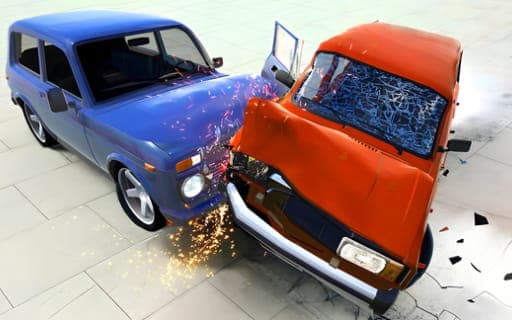
Beam Drive Car Crash Test Simulator
Game by Playgama. The provider may show ads and use cookies. Learn more
- Category
- Racing
- Platform
- Web browser
- Provider
- Playgama
- Price
- Free to play
About Beam Drive Car Crash Test Simulator
Beam Drive Car Crash Test Simulator is a sandbox built on destruction physics. You pick a car, take it onto a map and decide for yourself what counts as success: smash it into a heap of metal, or nurse it through every obstacle in one piece. A short onboarding at the start gets you driving quickly, and the physics handle the rest as panels bend and parts break away on impact.
Classic mode holds 8 ready-made maps, each with its own challenges, and a separate Map Editor world lets you build maps, set challenges and place obstacles of your own. The car list includes Caro, a muscle car, Flash, a futuristic electric model, and Syper, a sports car made for street racing; most are open from the start and more unlock as you play. Small driving details stand out too, with turn signals, hazard lights, a horn, a first-person cabin view, any paint color you like and the option to climb out and walk.
Game provided by Playgama
How to play Beam Drive Car Crash Test Simulator
Objective
There is no fixed win condition: take a car through a map's challenges, keep it intact or wreck it on purpose, and build new maps in the editor when the 8 built-in ones run out.
Controls
Desktop
- WASD: drive, walk or fly
- Space: handbrake
- C: change camera
- B: look back
- H: horn
- J: hazard lights
- Z and X: left and right turn signals
- Right mouse button: rotate the camera and click buttons
- Left mouse button: rotate the camera
- Mouse wheel: zoom the camera in and out
Mobile
- Left and right buttons: steer
- Accelerate button: drive forward
- Reverse button: back up
- Tap: press interface buttons
Getting started
- Go through the short onboarding at the start, which puts you behind the wheel within seconds.
- Open Classic mode, pick one of the 8 maps and choose a car such as the Caro, Flash or Syper.
- Paint the car any color you like, then drive out with WASD on a computer or the accelerate and steering buttons on a phone.
- Press C to try other cameras, or step out of the car and switch to first-person to see the damage from the cabin.
- When you want new scenarios, open the Map Editor and lay out your own map, challenges and obstacles.
Tips
- Since the sandbox has no single goal, set one yourself on each map, such as finishing its challenge with the car still intact.
- Hold the right or left mouse button to rotate the camera and roll the wheel to zoom out, so you can watch a crash from the best angle.
- Flash is fast and able to take a hit, Caro leans on raw power, and Syper is built for street racing, so each suits a different kind of run.
- The Map Editor puts no limit on scenarios, so build a short course of obstacles to repeat the exact crash you want to study.
Play in your browser. No download needed.
Beam Drive Car Crash Test Simulator FAQ
Does Beam Drive Car Crash Test Simulator have a set goal?
Not a fixed one. You can push a car through a map's challenges to see how much it survives, drive it from one end of a map to the other, or go straight to wrecking it, and each of those is a valid way to play the sandbox.
How many maps come with the game?
Classic mode includes 8 maps with different challenges and content. Beyond those, the Map Editor gives you a large separate world for building your own maps and placing obstacles, with no cap on the scenarios you create.
How do you drive on a phone?
On-screen buttons handle it. Left and right buttons steer, an accelerate button moves you forward and a reverse button backs up, while a tap on the interface presses its other buttons.
Can you leave the car?
Yes. You can step out of the vehicle, and WASD moves you on foot as well as behind the wheel. A first-person view also lets you watch the destruction from inside the cabin.