
Army Formation Games: Choose Units and Test Placement
On this page
In army formation games, a roster is a set of possible jobs, not simply a list from cheapest to most expensive. Some units can occupy the first contact, others attack from behind, and expensive pieces may need a formation that lets their abilities matter. Read the available roles before filling every deployment square.
Battle Simulator - Sandbox, WW1 Battle Simulator and Stickman Simulator Final Battle make the setup important. This guide focuses on selecting a useful mix and placement purpose; a separate sandbox experiment can then test that idea.
Choose units for a task in the formation
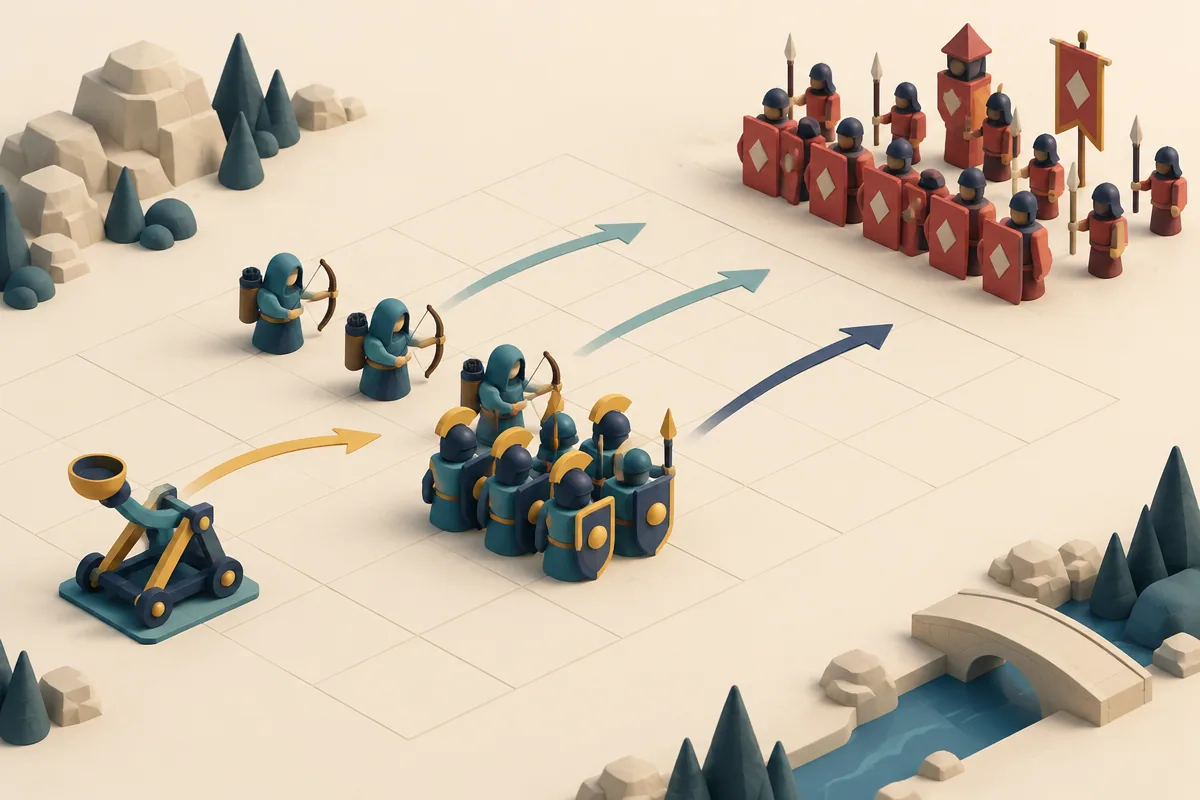
Illustration: A tight front block, a spaced rear line and a side support piece each take a separate job.
| Game | Documented roster or setup | Selection question |
|---|---|---|
| Battle Simulator - Sandbox | Melee weapons, shields, bows and heavier options | Which jobs does the lineup need? |
| WW1 Battle Simulator | Tanks and gun units with limited resources | What mix fits the deployment budget? |
| Stickman Simulator Final Battle | Troops and formations that grow through wins | Which available unit addresses the next enemy? |
Weapon appearance suggests a question to investigate, not a complete stat sheet. Read unit descriptions and observed behaviour before assuming range, armor or an exact counter.
Battle Simulator: give each group room to do its job
Battle Simulator - Sandbox offers prepared levels and a sandbox roster including swords, shields, spears, hammers, archers, cannons and firearms. Click to choose and place troops before the clash. The roster variety makes it useful to think in groups rather than isolated purchases.
Ask which units are expected to meet the enemy first and which need a clear opportunity to attack from farther away. A formation that blocks its own useful units can waste an expensive choice. Do not assume a shield grants unlimited protection or a cannon wins every matchup. The actual unit properties and enemy arrangement define whether a role makes sense.
WW1 Battle Simulator: balance the limited force
WW1 Battle Simulator uses tanks and gun units rather than a directly controlled shooter. Deployment happens before an automatic battle, and resources limit what can be fielded. Select a unit icon, choose a deployment position and start once the army is arranged.
Spend with the whole force in mind. One expensive unit can reduce the number of other positions you can cover, while many cheaper pieces may still lack the property needed against the enemy. Compare the available descriptions and the route of the first clash. The guide does not supply a historical unit chart or an exact optimal tank-to-gun ratio, so avoid treating one budget split as a universal solution.
Stickman Simulator: choose for the current opponent
Stickman Simulator Final Battle adds units and resources through victories. Its computer controls select an icon and an empty deployment square before the battle-start action. New options expand the plan, but they also create more ways to spend without addressing the current challenge.
Look at what the opposing formation presents. If your useful troops never reach a productive engagement, rearranging can matter as much as adding strength. If a particular enemy remains after the rest fall, ask which available unit is meant to address it. The relevant comparison is the lineup's task, not whether every newly unlocked unit must be included immediately.
Army formation games: build a role explanation before pressing start
Describe the formation in one sentence: this group takes first contact, that group contributes from a usable position, and the remaining purchase addresses a visible threat. If you cannot assign a purpose to an expensive unit, inspect alternatives before launching.
Afterward, watch which intended job failed. That observation can justify a different composition without pretending the battle outcome supplies exact hidden statistics. Start with a coherent mix, then use a controlled test to evaluate it rather than filling the roster by habit.
Related tags
Frequently asked questions
Do I control a soldier directly in WW1 Battle Simulator?
Its guide describes deployment followed by automatic combat. The meaningful inputs are unit selection, placement and the battle start.
Does a weapon name establish exact range or armor?
No complete stat table is provided here. Read the unit description and observed behaviour rather than inferring a guaranteed counter from appearance alone.
What roster variety does Battle Simulator offer?
The guide lists melee weapons, shields, bows, cannons and firearms, giving several possible roles to organise before a battle.
Should I use every newly unlocked stickman troop?
Not automatically. Choose the units that serve the current enemy and formation; an unlock expands options rather than requiring a slot.
Why can one expensive unit weaken the plan?
A limited budget means spending on it removes other choices. Judge whether its intended role is worth the lost coverage or support.
What should I review after the clash?
Compare the role you assigned each group with what it actually achieved. Identify the first job that failed before changing the entire army.
Try the game that fits your next challenge
Play Battle Simulator - SandboxMore strategy guides
 Strategy
Creator Career Games: Projects, Posts and Upgrade Plans
Compare simulated creator careers through game releases, profile activity and video publication. Choose the work loop and feedback you want to learn.
 Strategy
Land Clearing Games: Tools, Routes and Growing Work Areas
Compare garden cleanup, crop-machine work and logging deliveries. Choose tools, carrying upgrades and routes that complete the whole work loop.
 Strategy
Farm Management Games: Crops, Animals and Task Priorities
Choose farm games by crafting, crop-machine missions or egg production and protection. Compare the next task before expanding the homestead.
 Strategy
 Resource Choices: Spend, Save or Reinforce Now
Decide when strategy resources should fund growth, supply or immediate defense. Compare three games using a practical now, next and later check.