
Road Crosser
Free to play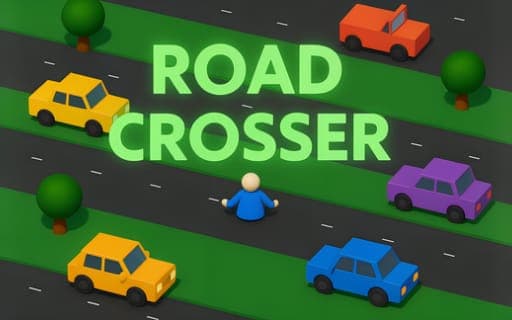
Road Crosser
Game by Playgama. The provider may show ads and use cookies. Learn more
- Category
- Arcade
- Platform
- Web browser
- Provider
- Playgama
- Price
- Free to play
About Road Crosser
Road Crosser is an endless crossing game rendered in 3D. The route ahead never runs out: busy roads alternate with forest strips and city lanes, and vehicles and other obstacles keep moving across your path. Your job is to keep advancing without being hit. A single collision ends the attempt, so every run is a push to get a little further than the one before.
Movement is not limited to going forward. You can step left and right to line up with a gap, and you can reverse when the lane ahead is too crowded, which gives you a way out of tight spots. On a keyboard you use the arrow keys or WASD, and on touch devices you swipe instead. The world has realistic lighting and animated scenery, and it runs in both desktop and mobile browsers.
Game provided by Playgama
How to play Road Crosser
Objective
Keep advancing along the endless route of roads, forests and city lanes, avoiding every vehicle and obstacle so the run lasts as long as possible.
Controls
Desktop
- Up Arrow or W: move forward
- Down Arrow or S: reverse
- Left Arrow or A: move left
- Right Arrow or D: move right
Mobile
- Swipe: navigate along the route on a touch device
Getting started
- Begin with the Up Arrow or W, or a swipe on touch devices, and study the first road for a gap in the traffic.
- Time each step forward between passing vehicles, since a single collision ends the run.
- Use Left and Right, or A and D, to slide sideways and line up with an opening before stepping into the next lane.
- When a lane fills up in front of you, back off with the Down Arrow or S instead of forcing a move.
- Cross the forest strips and city lanes as well, watching for obstacles there, and aim to get further than your last attempt.
Tips
- Reverse is a real option here, so step back with Down or S when traffic closes in rather than gambling on a tight gap.
- Line up sideways while you are still off the road, so the move into traffic is one quick step instead of several.
- Do not treat the sections between roads as a safe break; forests and city lanes have obstacles of their own.
- WASD and the arrow keys do the same job, so pick whichever hand position lets you react fastest and stick with it.
Play in your browser. No download needed.
Road Crosser FAQ
Can you move backwards in Road Crosser?
Yes. The Down Arrow or S key reverses, and on touch devices you swipe. Backing away from a crowded lane is often safer than pushing forward into it, since the run only lasts while you avoid collisions.
What keys does Road Crosser use?
Up Arrow moves forward, Down Arrow reverses, and the Left and Right Arrows step to the sides. W, A, S and D work the same way, so either set can be used on a keyboard.
Does Road Crosser work on a phone?
Yes. It supports touch as well as keyboard input and runs in mobile browsers, where you swipe to navigate the endless route. Desktop players use the arrow keys or WASD instead.
Does Road Crosser ever end?
No. The route of roads, forests and city lanes is endless, and a run continues until you collide with a vehicle or obstacle. Each attempt is about surviving further than the previous one.