
Keyboard Escape: +1 Speed | Sweets
Free to play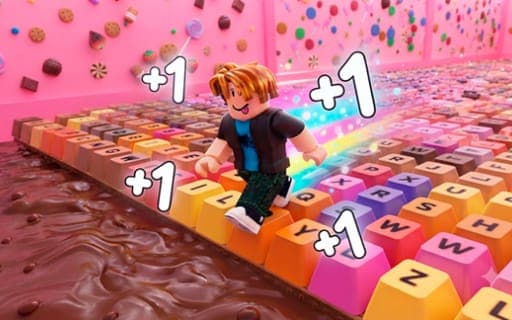
Keyboard Escape: +1 Speed | Sweets
Game by Playgama. The provider may show ads and use cookies. Learn more
- Category
- Arcade
- Platform
- Web browser
- Provider
- Playgama
- Price
- Free to play
About Keyboard Escape: +1 Speed | Sweets
Keyboard Escape: +1 Speed (Sweets) is a 3D obby run across an enormous keyboard whose keys are made of chocolate, caramel and other sweets. Its central rule is right there in the title: every step you take adds to your speed, so a run starts gently and keeps accelerating toward the finish line.
That growing speed is both the reward and the danger. The faster you go, the farther you can run, but jumps and turns get harder to judge, and a single wrong move or fall sends you back to the start. Along the track you pick up rewards and unlock power-ups and upgrades that make you quicker still. Wins feed a leaderboard where you set records against other players and chase the title of fastest runner. Soft key-press sounds and smooth animations give the candy world a calm ASMR feel that contrasts with the rising pace.
Game provided by Playgama
How to play Keyboard Escape: +1 Speed | Sweets
Objective
Reach the end of each candy track without falling, building speed with every step and earning upgrades so you can climb the leaderboard as the fastest runner.
Controls
Desktop
- W A S D: move your character
- Spacebar: jump
- Right mouse button + mouse movement: steer the camera
Mobile
- Virtual joystick: move your character
- Swipe the screen: pan and turn the camera view
- Jump button: jump over obstacles
Getting started
- Set off along the keyboard track with W A S D, or the virtual joystick on a phone, and notice your speed rising with each step.
- Keep the right mouse button down while moving the mouse, or swipe the screen, to angle the camera down the track.
- Time your jumps with the Spacebar or the jump button to clear gaps and obstacles on the chocolate and candy levels.
- Stay on the keys, because a fall or a wrong move sends you all the way back to the start of the track.
- Spend the rewards you collect on power-ups and upgrades, then race again to set a record on the leaderboard.
Tips
- Your speed keeps climbing with each step, so start jumps a little earlier as a run goes on; timing that worked at the start will be late near the finish.
- One mistake means starting over, so a steady, clean run is worth more than squeezing out extra speed with risky jumps.
- Swing the camera to look ahead before long stretches, because at high speed spotting the next obstacle early is what keeps you on the keys.
- Put rewards into upgrades between runs, since they raise your speed further and help you set records on the leaderboard.
Play in your browser. No download needed.
Keyboard Escape: +1 Speed | Sweets FAQ
What happens if you fall in Keyboard Escape?
A single wrong move returns you to the very start of the track. Because your speed builds with every step, later sections are the hardest to control, so focus matters as much as momentum.
How do you jump on a phone?
Press the jump button on screen. On mobile, the virtual joystick moves your character and swiping the screen pans and rotates the camera. On a computer, W A S D moves, the Spacebar jumps and the right mouse button with mouse movement turns the camera.
Can you compete with other players?
Yes. Victories feed into a leaderboard where you challenge other players and set records, working toward the title of the fastest runner. Upgrades and power-ups earned from rewards help you go faster on each attempt.