
Ninja Obby Speed Run
Free to play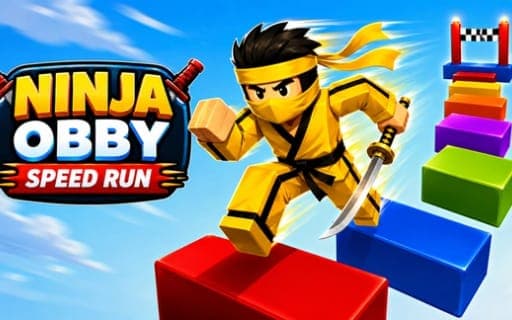
Ninja Obby Speed Run
Game by Playgama. The provider may show ads and use cookies. Learn more
- Category
- Arcade
- Platform
- Web browser
- Provider
- Playgama
- Price
- Free to play
About Ninja Obby Speed Run
Ninja Obby Speed Run is an obstacle-course racer with a ninja theme. There are hundreds of unique courses, and each run is about getting through as quickly as possible while staying on your feet. At checkpoints you meet glass doors, which your ninja power can smash so you keep moving without losing momentum.
Bonuses change how a run plays out. A speed boost, a giant mode and flight can all turn up, and while flying you can collect golden rings floating in the sky, which pay coins for the shop, where more items wait to be unlocked and your ninja can be customized. Two players can race side by side: one uses WASD and Space, the other the arrow keys and L. Holding the forward key sprints, and a quick double press of jump gives a double jump.
Game provided by Playgama
How to play Ninja Obby Speed Run
Objective
Race through each obstacle course as fast as you can, smashing the glass doors at checkpoints, using bonuses like flight and the speed boost, and collecting coins to unlock shop items.
Controls
Desktop
- W, A, S, D: move (Player 1)
- Space: jump (Player 1)
- Arrow keys: move (Player 2)
- L: jump (Player 2)
- Double-tap the jump key: double jump
- Hold the forward key: sprint
Getting started
- If a friend is joining, give them the arrow keys and L for jumping, while you keep WASD and Space.
- Start the course and hold the forward key to sprint, since every level rewards speed.
- Jump gaps with Space, or L for Player 2, and double-tap the jump key when you need a double jump.
- Reach each checkpoint and smash its glass door with your ninja power to keep your momentum going.
- Grab bonuses such as the speed boost, giant mode or flight, and collect golden rings while flying to earn coins.
- Spend those coins in the shop to unlock more items for your ninja.
Tips
- Keep the forward key held between obstacles, because sprinting is tied to holding it and letting go costs you speed.
- During flight, steer through as many golden rings as you can; they pay out coins, and coins are what unlock items in the shop.
- Save the double jump for gaps you misjudge, double-tapping the jump key only once a single jump is clearly coming up short.
- When racing a friend, settle the key split before the start: WASD and Space for one player, arrow keys and L for the other.
Play in your browser. No download needed.
Ninja Obby Speed Run FAQ
Can two people play Ninja Obby Speed Run together?
Yes. Player 1 moves with WASD and jumps with Space, while Player 2 moves with the arrow keys and jumps with L, so two players can race on the same computer.
How do you double jump?
Double-tap the jump key. That is Space for Player 1 or L for Player 2. To sprint, hold the forward key, which helps you build speed between obstacles.
What bonuses are there?
Speed boost, giant mode and flight. Each one changes how a run plays out, and flying lets you pick up golden rings in the sky that earn you coins for shop items.
What are the glass doors for?
They sit at checkpoints, and you smash them with your ninja power to keep going. Breaking through without slowing down is part of finishing each course quickly.