
Sprunki Sandbox: Ragdoll Playground Mode
Free to play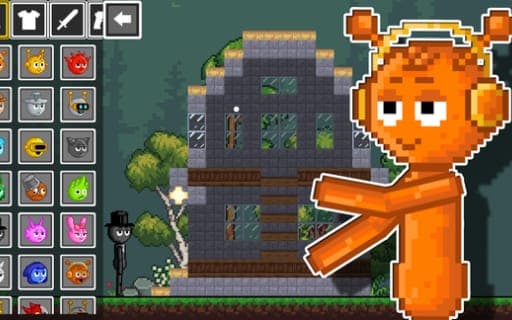
Sprunki Sandbox: Ragdoll Playground Mode
Game by Playgama. The provider may show ads and use cookies. Learn more
- Category
- Arcade
- Platform
- Web browser
- Provider
- Playgama
- Price
- Free to play
About Sprunki Sandbox: Ragdoll Playground Mode
Sprunki Sandbox: Ragdoll Playground Mode is a 2D physics sandbox with no goals beyond the ones you set. You pick Sprunki characters and items, drop them onto the playing field and see what the ragdoll physics does with them. Characters can be armed and set against each other, structures and traps can be built, and anything placed can be exploded, smashed or broken.
The arsenal ranges from swords and pistols up to rocket launchers and lasers, and explosives are part of the toolkit too. Construction is the calmer side: you can put up structures, rig traps and design whole arenas for fights. Every placed item has an action menu with options for it, and the scale of the scene can be changed, so a big setup fits on screen or a small brawl can be watched up close. The motto sums it up: your freedom, your rules.
Game provided by Playgama
How to play Sprunki Sandbox: Ragdoll Playground Mode
Objective
There is no win state: place Sprunki and items, arm characters, build arenas and traps, and experiment with destruction to see how the ragdoll physics reacts.
Controls
Desktop
- Left-click an item or character: select it
- Drag onto the field, or click it: place the selected item or character
- Left-click a placed item: open its action menu
- Mouse wheel: change the scale
Getting started
- Left-click the Sprunki character you want to use first, so it is selected and ready to place.
- Drag it onto the game field, or click an empty spot there, to make that character appear in the sandbox.
- Select and place a weapon the same way, whether a sword, a pistol, a laser or a rocket launcher, then set up a fight.
- Left-click any item already on the field to open its action menu and see what you can do with it.
- Turn the mouse wheel to change the scale whenever your scene grows or you want a closer look at the action.
Tips
- Build a structure or arena before adding explosives, so the ragdoll physics has walls and platforms to smash through.
- Open the action menu on each new item you place, to learn what it can do before building a whole scene around it.
- Combine the tools: build traps inside an arena, then drop armed Sprunki into it to see construction and combat collide.
- Change the scale before a big explosion so the whole arena stays on screen and none of the chain reaction is missed.
Play in your browser. No download needed.
Sprunki Sandbox: Ragdoll Playground Mode FAQ
Is there a goal in Sprunki Sandbox: Ragdoll Playground Mode?
No set goal. It is an open sandbox built around destruction, combat and construction, so you decide what to build, which weapons to hand out and what to blow up.
Which weapons can you use in the sandbox?
Weapons include swords, pistols, lasers and rocket launchers, with explosives on top. Characters can be armed with different weapon types and set against each other in battles.
How do you place things in Sprunki Sandbox?
Left-click the item or character you want, then drag it onto the game field or click there to make it appear. Left-clicking a placed item opens its action menu, and the mouse wheel changes the scale.