
Laser Slasher
Free to play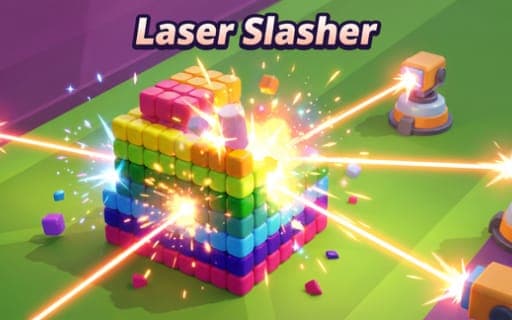
Laser Slasher
Game by Playgama. The provider may show ads and use cookies. Learn more
- Category
- Casual
- Platform
- Web browser
- Provider
- Playgama
- Price
- Free to play
About Laser Slasher
Laser Slasher gives you a set of laser turrets and a board of colorful blocks, and a stage is cleared once every block is gone. The turrets travel by themselves; your only job is deciding when they turn around and when they freeze. A quick press flips their direction and a held press stops them, so aiming is really a matter of timing those two actions.
Smashed blocks drop buffs, among them +1 Count, +1 Damage and +1 Speed, and gathering them makes your lasers stronger, which shortens the rest of the stage. Formations grow more complex as you progress. Outside the stages, turrets can be customized and upgraded, and a shop offers visual themes and skins that range from wooden textures to metallic finishes. Every block breaks with ASMR-style sound and particle effects, and the whole thing is tuned for relaxed play in short or long sessions.
Game provided by Playgama
How to play Laser Slasher
Objective
Destroy every block on the stage by reversing and stopping your laser turrets at the right moments, and collect the buffs that fall out so the job gets quicker.
Controls
Desktop
- Click the left mouse button or press Space: reverse the turrets' direction
- Hold the left mouse button or Space: stop the turrets moving
Mobile
- Tap and release: reverse the turrets
- Tap and hold: stop the turrets
Getting started
- Open a stage and watch how the turrets sweep on their own, noting which blocks their beams cross and which they miss.
- Click or press Space once, or tap and release on mobile, to send the turrets back the other way toward missed blocks.
- Hold the mouse button, Space or your tap to freeze the turrets while a beam rests on a block you want destroyed.
- Gather the buffs that drop from broken blocks, such as +1 Damage or +1 Speed, so the remaining blocks fall faster.
- Between stages, check the shop for new themes and skins, and look at turret customization and upgrades before tougher formations arrive.
Tips
- Stopping the turrets over a thick cluster keeps the beams cutting one spot, which clears dense parts of a formation without wasted sweeps.
- Go for buffs early in a stage, because every +1 Count, +1 Damage or +1 Speed makes each block after it quicker to clear.
- Use short reversals to rock the beams back and forth over a narrow band of blocks instead of letting the turrets drift across empty space.
- Later stages bring more complex formations, so put turret upgrades to use between stages rather than relying on buffs alone.
Play in your browser. No download needed.
Laser Slasher FAQ
What does a single click do in Laser Slasher?
A quick click of the left mouse button, a press of Space or a tap and release on mobile reverses the direction the turrets are moving. Holding any of those inputs instead stops the turrets in place.
Which buffs can blocks drop?
Broken blocks release buffs such as +1 Damage, +1 Count or +1 Speed, among others. Gathering them makes your lasers stronger and helps you finish the stage sooner, so they are worth collecting whenever they appear.
Are there skins or themes to unlock?
Yes. A shop offers unlockable visual themes and skins, from wooden textures to metallic finishes, and turrets can be customized and upgraded as you work through increasingly complex block formations.
Is Laser Slasher a stressful game?
Not really. It is built for stress-free play, with ASMR-style effects each time a block shatters and a one-input control scheme, and stages suit a five-minute break as well as a longer session.